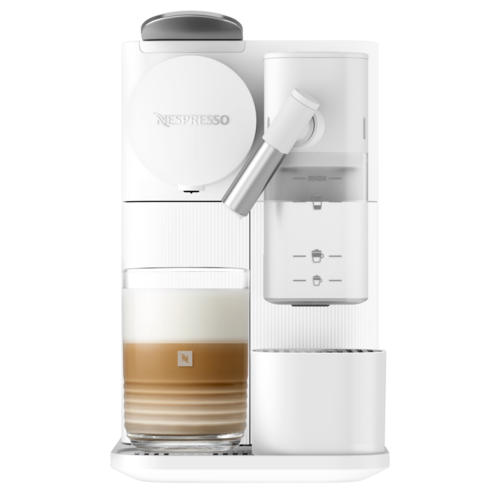
Nespresso Troubleshooting Lattissima One
Select another machineLattissimaOne|MilkCoffeeMachine|NespressoEgypt

First use or after a long period of non-use

Coffee Preparation

Assembling / disassembling of the Rapid Cappuccino system (R.C.S)

Preparing Cappuccino and Latte Macchiato

Programming coffee quantity

Daily care
Hand washing of Rapid Cappuccino System

Restoring quantity to factory settings
Factory settings

Water hardness setting

Emptying the system before a period of non-use

Automatic power off

Descaling
No light indicator.
- Check the mains, plug, voltage, and fuse. In case of problems, call Nespresso.
No coffee, no water.
- Water tank is empty. Fill water tank.
- Descale if necessary; see Descaling section.

Coffee comes out very slowly.
- Flow speed depends on the coffee variety.
- Descale if necessary; see Descaling section.
No coffee, just water runs out (despite inserted capsule).
- In case of problems, send appliance to repair or call Nespresso.

Coffee is not hot enough.
- Preheat cup.
- Descale if necessary; see Descaling section.
Capsule area is leaking (water in capsule container).
- Position capsule correctly. If leakages occur, call Nespresso.
Irregular blinking.
- Send appliance to repair or call Nespresso.
All buttons blink simultaneously for 10 seconds and then machine switches off automatically.
- Error alarm, machine needs repair. Send appliance to repair or call Nespresso.
All 3 buttons blinking fast 3 times and then machine goes back in ready mode.
- Water tank is empty.
Descaling and cleaning alert blink.
- Machine is in menu mode, press milk button for 3 seconds to exit menu mode or wait 30 seconds to exit automatically.
Descaling alert shines orange.
- Machine triggers descaling alert according beverages consumption usage. Descale machine.
Descaling alert blinks orange and Warm milk froth steady light.
- Machine is in Descaling mode. Press milk button to start descaling process.
Clean alert shine orange.
- Disassemble the Rapid Cappuccino System and clean all components in the upper side of your dishwasher. In case a dishwasher is not available, refer to section "Hand washing of Rapid Cappuccino System".
All coffee buttons and all milk recipe buttons flash alternatively.
- Machine overheat, wait until machine cools down.
- Appliance will be blocked for approximately 10 minutes after emptying.

Lever cannot be closed completely.
- Machine overheat, wait until machine cools down.
- Appliance will be blocked for approximately 10 minutes after emptying.

Quality of Milk froth is not up to standard.
- Use skimmed or semi-skimmed cow milk at refrigerator temperature (about 4° C).
- Rinse after each milk preparations (see section "Hand Washing of Rapid Cappuccino System").
- Descale the machine (see p.23).
- Do not use frozen milk.
- Ensure the air aspiration part is clean. Refer to the section "Hand washing of Rapid Cappuccino System".

I cannot enter Menu mode.
- Be sure to remove the milk jug.
- Be sure to press milk button for 3 seconds.
- Remove descaling pipe.
Milk system does not start.
- Fill up with minimum 30 ml of milk.
- The milk system does not work when filled with water.
- The milk system has not been designed to work with vegetale milk (rice, etc).
The milk jug cannot be dismantled.
- Press the button on the side of the milk jug to remove the parts.
- Refer to section "Assembling/Disassembling of Rapid Cappuccino System".
Turn off the machine.
- Press Espresso and Lungo button for 2 seconds.
Sound when machine switches off.
- This sound indicates that the machine is now off.
Specifications

Weight4.3 Kilogram
Removable water tank1 litre

Dimension (WxDxH)15.4 X 32.4 X 25.6 cm

Pressure19 bar
Automatic power offafter 9 mins

Used capsules container capacity8
Warranty2 years